
The default option in Newsletter Studio is to send emails using the SMTP protocol. Most email service providers like SendInBlue, Mailgun, Mailjet, and Amazon SES support this protocol.
By default, Newsletter Studio will render and send emails as fast as possible.
Some SMTP relay services (like e.g. Microsoft 365 and AWS) apply rate limits on how fast you are allowed to send using their service. This could introduce issues if the rate limits of the SMTP-server are exceeded. In this case, you will see many e-mails with the status "Delivery failed" and probably error messages indicating that the e-mail was not sent due to rate limits.
If your provider enforces restrictions, you can use our rate limit feature when you configure SMTP to respect your provider's limits.
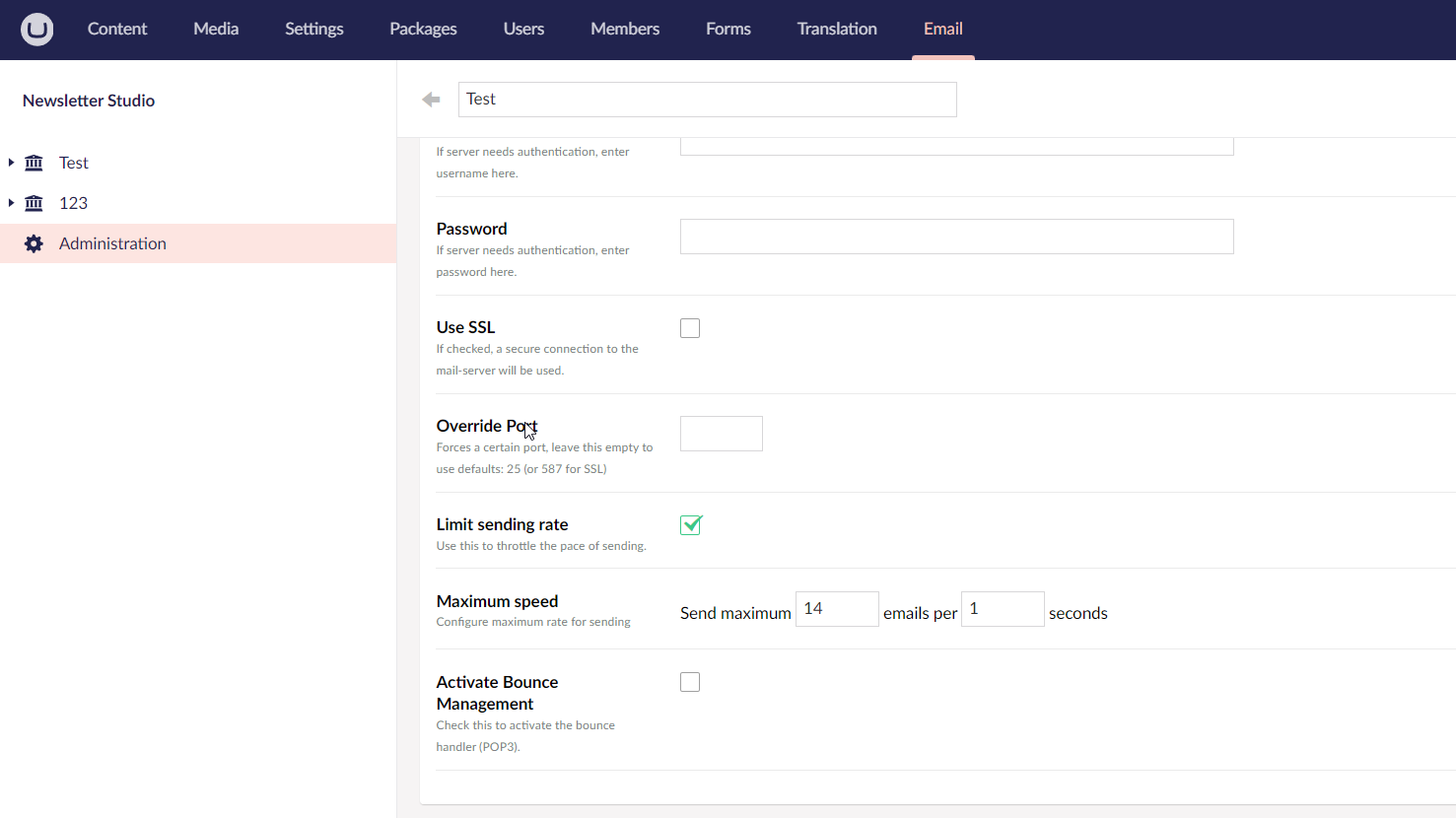
The rate limit settings control how many emails Newsletter Studio is allowed to send during a given time period. Use these settings when your SMTP provider has a documented sending limit, or when you see throttling errors during campaign delivery.
Newsletter Studio uses batches and workers to control how campaigns are processed. These settings affect how quickly emails are sent, how often progress is saved, and how much work might need to be retried if something fails.
When a campaign is sent, a coordinator will create a queue and spin up a number of workers to process the queue. The workers will process the queue by claiming a batch of emails for delivery, perform the delivery using an Email Service Provider and report back to the coordinator.

The package ships with configuration defaults that keep a balance between speed, server/database load, checkpointing, and the most common rate limit restrictions with SMTP Providers.
The default batch size is intentionally small to allow frequent checkpointing. This ensures that progress is persisted regularly and limits how much work needs to be retried if an unhandled exception occurs.
If you need to send faster, you can adjust these settings to raise the throughput. The trade-offs include load and checkpointing, depending on your settings.
There are two "layers" of configuration:
These settings are configured by the Email Service Provider depending on the supported batch sizes. Email Service Providers allow configuration of:
For example, a provider that sends using a REST API might support sending 25 emails in a single call to the API-service. It might claim 100 items from the queue (Max Items Per Batch) and then send them in 4 calls to the service (Send Batch Size).
Another scenario is SMTP. We might want to claim 10 items from the queue (Max Items Per Batch) and ensure that we persist the state after each delivery by setting Send Batch Size to 1.
Configuration could be internal to the concrete Email Service Provider implementation, but some of them expose settings that you can configure. You could also implement your own from scratch or by inheriting from an existing provider.
The worker manager configuration applies at a higher level and allows you to override batch settings from Email Service Providers.
The configuration includes:
MaxItemsPerBatch on the Email Service Provider is used. This setting can be used to limit the load if the Email Service Provider has a very high batch size and your infrastructure is under heavy load during sending. (default: 10)You can use appsettings.json to override the default values. Place the settings under the NewsletterStudio section:
{
    "NewsletterStudio" : {
        "Delivery": {
            "Workers": 10,
            "CycleBatchSize": 20,
            "SendBatchSize": 10
        }
    }
}
Delivery.Workers, the number of workers to use while progressing the queue.Delivery.CycleBatchSize, the number of items to claim from the queue in each cycle. Sets the max batch size for both workers and SMTP-implementation.Delivery.SendBatchSize, applies to the default SMTP-implementation. The number of emails to send before persisting the result to the database.You are encouraged to test settings and measure the results in your specific environment, a couple of things to keep in mind:
If you want to handle bounces for your emails you can provide a mailbox where the package can look for these bounce emails. The package will check periodically and update the state of the recipients and any tracking information if it detects a bounce.
The logic for detecting a bounce is based on industry standards and looks for the status-header in the email. This header should contain a number indicating any delivery issues.
Newsletter Studio also looks at the headers diagnostic-code and final-recipient to figure out if the email is in fact a bounce and who was the intended recipient.
The "bounce-email" is sent from the intended recipient's mail server and not all mail servers follow standards. This means that the package might be unable to parse certain bounce emails. This is expected, as we don't want to set a recipient as bounced if we're not 100% sure.
If you need to support bounce emails that Newsletter Studio can't detect by default, you can override the logic using the BounceDetector.OnDetectingBounce-event handler like this:
using NewsletterStudio.Core.Mail.Common;
using Umbraco.Cms.Core.Composing;

public class HandleBouncesComposer : IComposer
{
    public void Compose(IUmbracoBuilder builder)
    {
        BounceDetector.OnDetectingBounce += (object sender, OnDetectingBounceEventArgs args) =>
        {
            // Inspect message
            if (args.Message.RawContent.Contains("invalid recipient"))
            {
                var recipientEmail = "recipient@example.com";

                // Set OverrideResult to override the result
                // from the built-in bounce parser.
                args.OverrideResult = new BounceResult()
                {
                    IsHardBounce = true,
                    FinalRecipient = recipientEmail
                };
            }

        };
    }
}